

Click here to self-schedule your appointment.

Access the Patient Portal

Your health information, when and where you need it.

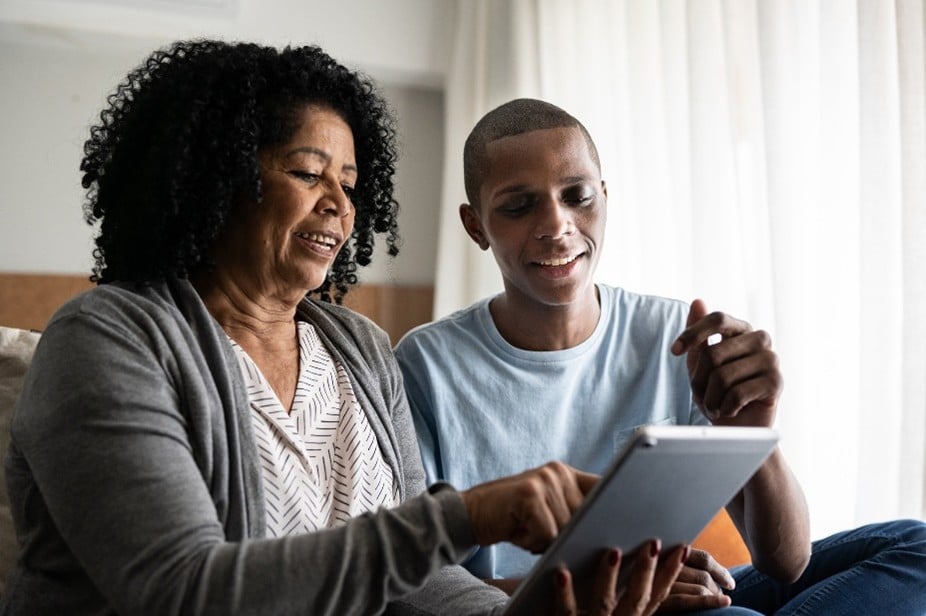
A mother and son smile while viewing health information on a tablet, representing Community Health Center's accessible digital care and patient engagement.

Access health information 24/7 with our Patient Portal, myCHC.

Our patient portal, myCHC is a secure, convenient, and easy way to access your health information anytime you need it.
  • Communicate with your providers
  • Get reminders and appointment history
  • Access your test results
  • View your medications and request refills
Follow the steps below to download and connect with myCHC.
1. Download the Healow App on your mobile device
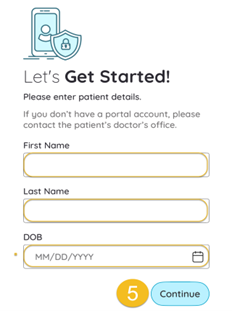
2. Enter your first name, last name and date of birth
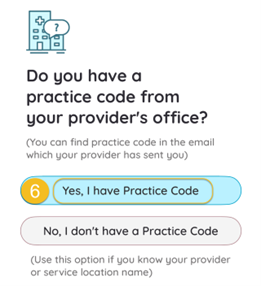
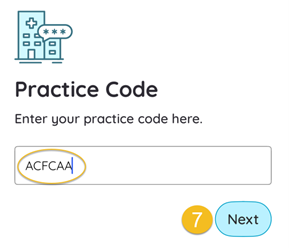
3. Enter the CHC practice code: ACFCAA and verify
4. A confirmation code will be sent to the mobile number(s) on file.


Tip: If your mobile number is not listed, please call us at 860-347-6971 to update your contact information. If you do not remember your username and/or password, click Trouble Logging In? in bottom right corner.

New users that do not have an associated phone number or portal credentials should compete the sign up form and allow 48 hours to access patient records in portal.


1. Download the Healow App on your mobile device
Lets Get Started

2. Enter your first name, last name and date of birth
Practice Code

3. Enter the CHC practice code: ACFCAA and verify
Practice Code Input

4. A confirmation code will be sent to the mobile number(s) on file.
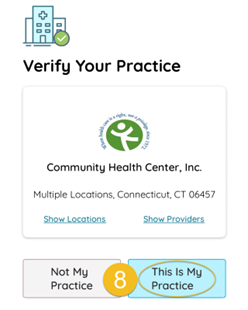
Verify

Already have an account?

Log In Here

Three members of a CHC pod look at laptops to consider a patient's chart
Our providers keep your information up-to-date so you can access anytime.